Your printer wants a vector logo. What to do with an AI-made one
Signwriters, embroiderers and printers often ask for a vector logo. Why an AI logo usually isn't one, how to tell, and how to get a file that works everywhere.
· 5 min read
By the Blessed Pixels team
The email usually arrives just after you've paid the deposit. The signwriter doing your van, the company embroidering your polo shirts or the printer making your shop sign writes: "Lovely logo. Could you send it as a vector, please?"
If you made the logo with ChatGPT, Midjourney, Canva or another AI tool, you probably have a PNG or a JPG. That's a picture made of pixels. A vector is something different, and for some jobs it's the only thing that works.
This guide explains the difference in plain terms, how to tell which one you have, and the ways to get a proper vector logo from an AI design.
Pixels and vectors, without the jargon
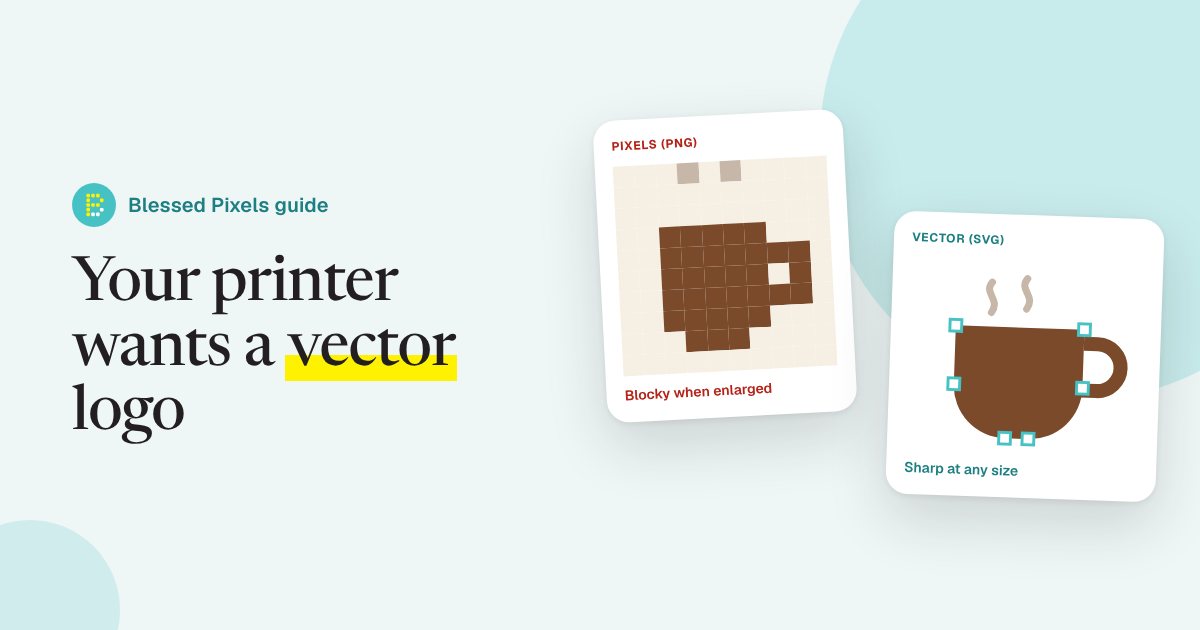
A pixel image is a grid of tiny coloured squares. Zoom in far enough and you see the squares. Make it bigger and the computer has to guess what goes in the gaps, so edges go soft and blocky. Photos and most AI images work this way.
A vector is a set of instructions: draw a curve from here to here, fill this shape with this exact colour. Because it's a description rather than a grid, it stays perfectly sharp at the size of a business card or the side of a lorry.
Logos are ideal for vectors. They're usually a few shapes, a few colours and some lettering, and they need to work at every size you'll ever use them. We go into the sizing problem for pictures in how big you can print an AI image. A logo has the same problem, only more often, because it goes on everything.
If you'd rather someone else made the vector version, our print-ready packages include a vector logo as an extra, and the Business pack includes it as standard.
Who will ask for a vector, and why
Not every job needs one. A logo on a flyer printed at its normal small size is often fine as a large, sharp PNG. These are the ones where people tend to insist:
- Signwriters and sign makers. Vinyl lettering for vans and shop windows is cut by a machine that follows the outlines of the shapes. It needs paths to follow, not pixels.
- Embroidery. The logo has to be turned into stitches, and a clean vector makes that much easier and more accurate.
- Screen printing on clothing and promotional products. Each colour is printed separately, so the colours need to be clean, solid areas.
- Large signs, banners and exhibition stands, where a pixel logo would need to be enormous to stay sharp. Our banner and canvas set-up extra exists for exactly these.
- Anyone designing for you later. A designer making your website or menu will be glad of a vector they can recolour and resize.
Workwear and print companies usually publish their own requirements. Workwear Express's artwork guidelines are a typical example of the kind of page worth reading before you send anything. Check your own supplier's page, because what they accept varies.
How to tell what you've got
File names give it away most of the time.
- PNG, JPG, JPEG, WEBP, HEIC: pixels. Even if it looks crisp on your phone.
- SVG, EPS, AI: usually vectors.
- PDF: could be either. A PDF can hold a vector or just wrap a pixel picture.
A quick test for a PDF or an SVG: open it and zoom in as far as you can on a curved edge. If it stays smooth at any size, it's a vector. If it turns into steps or goes fuzzy, it's pixels inside a vector-looking file. That trick catches a lot of people, because simply saving a PNG "as" a PDF or SVG doesn't change what's inside.
Some AI tools now advertise vector or SVG output directly, and that's genuinely useful. Still check the result: zoom in, count how many colours it uses, and make sure the lettering is real letters rather than wobbly shapes. Garbled AI lettering is one of the common problems we fix.
Three ways to get a proper vector logo
1. Automatic tracing
Free and paid tools can trace a pixel image and turn it into vector shapes. The open-source editor Inkscape has a tracing feature, and many design apps do too.
It works best on simple, flat logos with a few solid colours. It struggles with gradients, soft shadows, fine detail and lettering, which often comes out lumpy. Expect to tidy it up afterwards.
2. Simplify the design first
AI logos are often more complicated than they need to be: a subtle gradient, a glow, textures, tiny details. None of that survives embroidery or vinyl cutting. Ask the AI for a flat version with two or three solid colours and no shading. You'll get a far better trace, and usually a stronger logo.
3. Have it redrawn
A person rebuilds the logo as clean shapes, swaps the made-up lettering for a real font, sets exact colours and checks it at tiny and huge sizes. It takes longer than tracing, but it's the version that will last. This is what our vector logo extra does, with a simple and a detailed option depending on the design, as described on the print-ready artwork page.
What a finished logo pack should include
Whichever route you take, aim to end up with:
- A vector master file, as SVG, EPS or PDF.
- A full-colour version and a single-colour version (black, and white for dark backgrounds).
- The exact colours written down, so every supplier matches them.
- Large PNGs for everyday use: social media, emails, your website.
- A note of where the logo came from, including the AI tool and the date, in case you register it as a trade mark later.
That last point links to a bigger question about ownership, which we covered in using AI images on flyers, menus and vans. Our print artwork terms explain what we can and can't promise about AI images.
Frequently asked questions
Is an SVG always a vector?
Usually, but not always. An SVG can contain an embedded pixel image. Zoom in on a curve: if it stays smooth, it's a true vector.
Can I just save my PNG logo as a PDF?
You can, but it won't become a vector. The PDF will hold the same pixels. A printer who needs a vector will spot it.
Why does my embroidered logo look different from the screen?
Thread can't show gradients or tiny details, so the design has to be simplified into solid areas. Starting from a clean, flat vector gives the best result.
Do I need a vector for my website?
Not essential, but an SVG logo stays sharp on every screen and is often a smaller file. Large PNGs work fine too.
How much does it cost to vectorise a logo?
It ranges from free (doing it yourself with a tracing tool) to paying a designer to redraw it. Simple, flat logos cost less than detailed illustrations because there's less to rebuild.